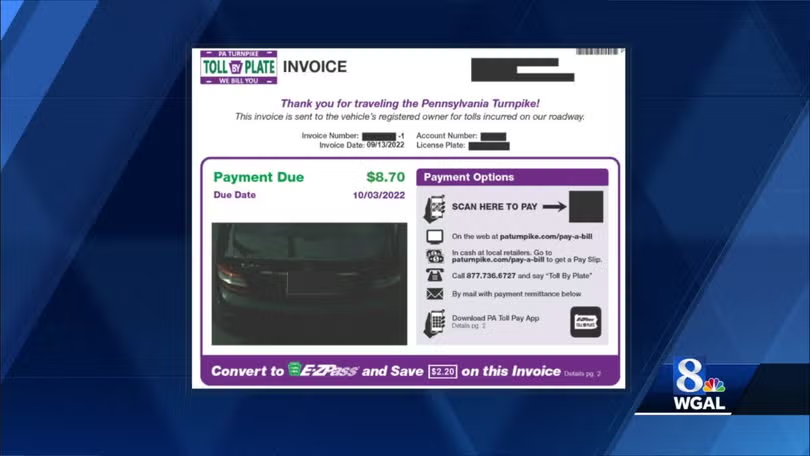
If you drove on the Pennsylvania Turnpike and now have a Toll By Plate invoice or unpaid toll notice, you probably want to pay it quickly before fees, violations, or registration holds stack up. The good news is you can pay your PA Turnpike bill online, through the PA Toll Pay app, by phone, by mail, or with cash at participating retail locations.
This guide explains all the official ways to pay a PA Turnpike toll bill from paturnpike.com/pay-a-bill, including Toll By Plate, E‑ZPass replenishment, and other turnpike invoices. It also includes practical tips if you lost your invoice, want to pay with cash, or are worried about enforcement notices and extra fees.
Quick Links to Pay Your PA Turnpike Bill
- PA Turnpike Pay a Bill hub: https://www.paturnpike.com/pay-a-bill
- Toll By Plate portal (look up and pay toll invoices): https://www.paturnpike.com/toll-by-plate
Step-by-Step: How to Pay Your PA Turnpike Toll By Plate Bill
The Pennsylvania Turnpike Commission offers several ways to pay your tolls and invoices: online through the Toll By Plate site, the PA Toll Pay mobile app, by phone, by mail, in person at the E‑ZPass Customer Service Center, and with cash at hundreds of retail locations through the KUBRA cash payment network.
1. Pay Your Toll By Plate Invoice Online
If you received a Toll By Plate invoice in the mail or email, the fastest way to pay is online via the PA Turnpike’s official Toll By Plate website.
Where to go
- Go to Toll By Plate: https://www.paturnpike.com/toll-by-plate.
How it works
- Click to Pay Toll By Plate.
- Enter the invoice number and the license plate information from your bill.
- Review your toll charges and any fees.
- Pay with a debit/credit card or other methods offered in the portal.
Paying online is usually the quickest way to clear your PA Turnpike Toll By Plate bill and avoid further enforcement steps.
Pros
- Fast, secure, and available 24/7.
- You can see the tolls linked to your plate and invoice before paying.
Cons
- You need your invoice number and plate details; if you lost them, you may need to call or use other lookup options.
2. Pay Using the PA Toll Pay Mobile App
The PA Toll Pay app is the official mobile app for managing PA Turnpike tolls, including Toll By Plate invoices and E‑ZPass accounts.
Where to get it
What you can do in the app
- View and pay Toll By Plate invoices.
- Manage your E‑ZPass account and replenishments.
- Set up cash payment options at retail locations via the KUBRA network.
Pros
- Convenient if you regularly use the Turnpike and want everything in one app.
- Good for getting alerts and checking balances on the go.
Cons
- Requires app installation and an account/profile setup.
3. Pay by Phone
If you prefer to pay your Toll By Plate invoice by phone, you can call the PA Turnpike’s Customer Service Center.
Phone number
- 1‑877‑736‑6727 (PA Turnpike Customer Service Center).
How to pay
- Call 1‑877‑736‑6727 and, when prompted, say “Customer Service” to reach a representative.
- Have your invoice number and license plate ready so they can locate your Toll By Plate charges.
- The agent will walk you through paying by card or other available methods over the phone.
Pros
- Helpful if you do not have internet access or have a question about your bill before paying.
Cons
- Limited to Customer Service Center hours.
4. Pay by Mail with Check or Money Order
You can mail a check or money order to pay your Toll By Plate invoice.
Mailing address for Toll By Plate
How to pay by mail
- Make your check or money order payable as indicated on your invoice.
- Include the payment stub and write your invoice number and license plate number on the check or money order.
- Mail early enough to allow for postal and processing time before any due date or enforcement escalation.
Pros
- Good if you prefer not to pay online or by phone.
Cons
- Slowest option; not ideal if you are close to a violation or registration suspension.
5. Pay with Cash at the E‑ZPass Customer Service Center
If you want to pay your Toll By Plate invoice with cash directly, you can do so at the PA Turnpike E‑ZPass Customer Service Center.
Address
Pros
Cons
- Requires traveling to Harrisburg and visiting during business hours.
6. Pay with Cash at Retail Locations (KUBRA Cash Payment Network)
The PA Turnpike now offers expanded cash payment options through the KUBRA Cash Payment Network, allowing you to pay toll invoices and E‑ZPass replenishments at hundreds of retail locations across Pennsylvania.
How it works
- Through the PA Toll Pay app or your online account, choose a cash payment option for your Toll By Plate invoice or E‑ZPass replenishment.
- The system generates a pay slip or barcode with the amount and account info.
- Take the pay slip to a participating retailer (such as certain convenience stores or pharmacies) in the KUBRA Cash Payment Network.
- Pay the amount in cash. The retailer scans your slip and transmits the payment to the Turnpike.
Fees and timing
- Retail cash payments include a service fee (recent coverage notes about $1.50 per transaction for some locations).
- Payments are typically transmitted electronically but may not be instantaneous; check the app or your invoice for expected posting times.
Pros
Cons
- Retailers charge a service fee, and there can be a short delay before the payment posts.
7. Other Invoices on paturnpike.com/pay-a-bill
The Pay a Bill hub at paturnpike.com also lets you pay other types of Pennsylvania Turnpike invoices, such as:
- Property damage invoices.
- Permit invoices.
- Benefit invoices.
- Other Turnpike-related bills.
For these, you typically:
- Visit Make a Payment: https://www.paturnpike.com/pay-a-bill/make-a-payment.
- Select the invoice type, enter the information from your bill, and pay online or follow instructions to mail payment.
Tips and Extra Help for PA Turnpike Customers
These tips focus on guest/one‑time payments, phone help, locations, and avoiding enforcement problems.
Use the Official Toll By Plate Site or PA Toll Pay App for Speed
If you have your invoice number handy, paying directly at paturnpike.com/toll-by-plate or via the PA Toll Pay app is usually the fastest and cleanest way to clear your bill. This avoids third‑party services and gives you direct confirmation that the Pennsylvania Turnpike Commission has received your payment.
Call 1‑877‑736‑6727 if You Cannot Find Your Invoice
If it has been weeks since you drove on the Turnpike and you still have not received a Toll By Plate bill, or if you lost your invoice, call the Customer Service Center at 1‑877‑736‑6727 and say “Customer Service” when prompted. Representatives can help you look up your tolls using your license plate and travel information, then explain how to pay before fees escalate.
Example: Paying a Missed Toll Before Enforcement Escalates
Sam drove through the PA Turnpike without E‑ZPass and forgot about it until a Toll By Plate invoice arrived with a due date approaching. Instead of waiting, Sam opened the PA Toll Pay app, found the invoice under Toll By Plate, and paid with a debit card in a few taps. Because the bill was paid before the due date, it never moved into toll enforcement, and Sam avoided extra fees and registration issues.
Use Official Channels Instead of “Pay Later” Services for Critical Bills
Some services, like Deferit, advertise that they can pay your PA Turnpike Toll By Plate bill and let you repay them in installments for a monthly membership fee. While this can spread out your cost, the Turnpike only considers the bill paid when their payment actually posts, and third‑party timing is outside their control. If you are close to a due date, enforcement notice, or registration hold, use official PA Turnpike channels (website, app, phone, mail, or KUBRA cash) instead.
Check Enforcement Notices and Deadlines Carefully
If you receive a toll enforcement notice or warning of registration suspension, read the deadlines carefully and pay using a fast method like online payment, PA Toll Pay app, phone payment, or KUBRA cash at a retailer. Waiting until the last minute and mailing a check or using a slower third‑party payment could mean your payment arrives too late to stop enforcement action.
FAQs About Paying Your PA Turnpike Toll By Plate Bill
How do I pay my PA Turnpike Toll By Plate invoice online?
Go to Toll By Plate at https://www.paturnpike.com/toll-by-plate, enter your invoice number and license plate information, review the toll charges, and pay with a card or other options offered in the portal. You can also use the PA Toll Pay app on iOS or Android to view and pay Toll By Plate invoices from your phone.
Can I pay my PA Turnpike toll bill by phone?
Yes. Call the PA Turnpike Customer Service Center at 1‑877‑736‑6727, then say “Customer Service” when prompted. A representative can look up your Toll By Plate invoice and take your payment over the phone using your card or other available methods.
How do I pay my Toll By Plate invoice with cash?
You can pay in cash at the PA Turnpike E‑ZPass Customer Service Center in Harrisburg (300 East Park Drive, Harrisburg, PA 17111). You can also pay cash at hundreds of participating retailers by generating a KUBRA cash pay slip via the PA Toll Pay app or online account, then bringing it to a store; a small service fee (around $1.50) applies for cash payments at retail locations.
What should I do if I never received my Toll By Plate bill?
If it has been awhile since you drove on the Turnpike and you have not received a bill—or you lost your invoice—call 1‑877‑736‑6727 and say “Customer Service” to speak with an agent. They can help you look up any outstanding Toll By Plate invoices using your plate and travel details so you can pay before additional fees or enforcement actions apply.
Are third‑party “pay later” services recommended for PA Turnpike tolls?
Third‑party services like Deferit can pay your Toll By Plate invoice and let you repay them later for a monthly fee, but they are not official PA Turnpike channels. Because the Turnpike only credits your account when they receive the payment, these services may introduce delays; for urgent or enforcement‑related tolls, the Turnpike recommends paying directly via their website, app, phone line, mail, or authorized cash network instead.