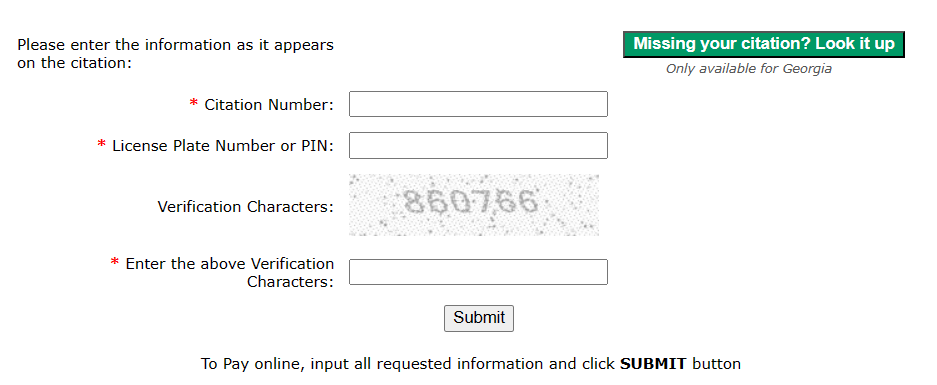
Many school‑zone and automated speed camera tickets can be paid through secure.speedviolation.com or ViolationPayment.net, using the citation number and license plate from your mailed notice.
1. Pay Online at Secure.SpeedViolation.com
This portal is used for a variety of school‑zone speed camera programs (e.g., Valdosta GA, Lilburn GA, Hillsborough County FL, St. Michaels MD). Always follow the instructions on your specific notice.
Basic steps (wording may vary by city):
- Go to **https://secure.speedviolation.com
- Enter:
- Your Notice/Citation Number (format like XX‑000000012, or as printed).
- Your License Plate Number exactly as it appears on the citation.
- Sometimes a PIN or verification characters if requested.
- Click View / Pay and follow prompts to pay with a credit/debit card (Visa, Mastercard, Discover; sometimes others).
Some agencies note a convenience fee (for example, around $3.50) for paying online via SpeedViolation.
2. Pay Online at ViolationPayment.net
Other school‑zone and local automated enforcement programs use ViolationPayment.net.
- Go to https://www.violationpayment.net and click to pay/view citation.
- Enter:
- Citation/Notice Number, and
- License Plate Number (letters/numbers only; no state code).
- Review photos/video of the violation and pay using credit/debit card (Visa, Mastercard, Discover).
ViolationPayment’s FAQ confirms online card payments are processed securely and that due dates and late‑fee rules are printed on the citation.
3. Pay by Phone or Mail
Phone numbers vary by jurisdiction; examples:
- ViolationPayment.net programs (Savannah, Lawrenceville, Chatham County, Hollywood FL, etc.):
- Call 855‑252‑0086 (24/7).
- Listen to prompts; press 9 or 0 for a representative.
- Have your citation number, name, or tag number ready.
- Secure.SpeedViolation.com programs (Hillsborough County FL school zones, etc.):
Mail:
- Send a check or money order (no cash) to the mailing address on your citation, made payable to the city or school‑zone program named (e.g., “City of Valdosta School Zone Safety Program,” “St. Michaels Photo Enforcement Program”).
- Write your notice/citation number on the front of the payment.
4. Legitimacy and Security Checks
Because there are many toll and camera scams, always confirm:
- Your city/county .gov page lists secure.speedviolation.com or violationpayment.net as the official payment site (examples include Valdosta GA, Lilburn GA, Savannah GA, St. Michaels MD, Chatham County GA).
- The URL starts with “https://” and matches exactly what is printed on your paper citation or on the official government site.
- The citation was mailed to you, not just emailed or texted. Agencies emphasize that real notices arrive by mail; texts with payment links are a common scam pattern.
If anything looks off, use the phone number printed on your citation or on the local police/city website, not in a random email or text.
5. Quick FAQs
What do I need to pay online?
Your citation/notice number and license plate number, and sometimes a PIN/verification code, exactly as shown on the mailed notice.
Can I pay by phone instead?
Yes. Most programs allow 24/7 card payments by phone (e.g., 855‑252‑0086, 888‑756‑4918, 877‑220‑7973, 833‑600‑6400, depending on your city).
Is there a payment plan option?
This varies by agency; ViolationPayment’s FAQ says you must call 855‑252‑0086 to ask if your issuing agency offers plans.
How do I know when it’s due?
The due date appears on the citation (often top‑right and bottom‑right); late or missed payments can trigger late fees or additional penalties.
If you tell me the city or county on your notice, I can point you to that jurisdiction’s exact instructions and phone number.
