If you got an Alabama traffic ticket and your court date is coming up fast, you can usually pay it online through AlaPay, by phone, by mail, or at the courthouse. The Alabama Traffic Service Center at traffic.alacourt.gov is the official hub that points you to the right payment options and explains what to do if your ticket isn’t in the system yet or if you need more time to pay.
👉 Pay your bill here:
- Pay Alabama Traffic Ticket Online – AlaPay
- Alabama Traffic Ticket Payment Info – traffic.alacourt.gov/pay
How to Pay Your Bill
Pay Without Login (Guest Pay)
Alabama does not use a username/password “account” system for basic traffic ticket payments. Instead, you pay as a “guest” by searching your ticket in the AlaPay system.
You need:
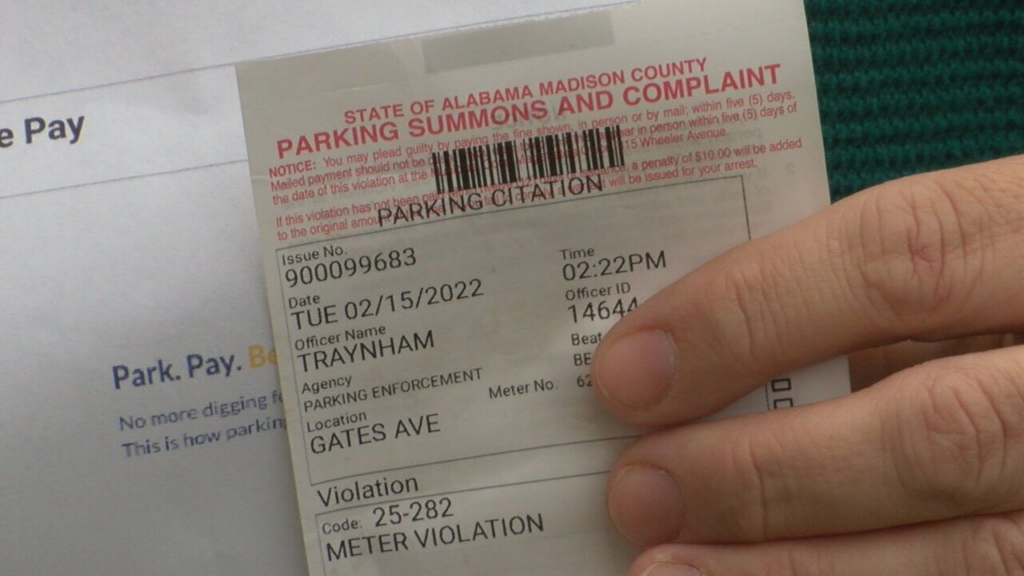
- Your traffic ticket (UTC) number, from the upper right of your citation.
- Your date of birth (for ticket search), or case number + SSN + DOB if you search by case.
Steps:
- Wait up to 10 days after the ticket date so the court can enter it into the system.
- Go to AlaPay: https://www.alapay.com.
- On the homepage, choose Traffic Tickets.
- Select how you want to search:
- Pay Ticket (By Ticket Number) – requires UTC number + date of birth, or
- Pay Ticket (By Case Number) – requires case number + SSN + date of birth.
- Enter the required information exactly as it appears on your ticket or court paperwork.
- The system will show your ticket details and amount owed; review them carefully.
- Continue through Search → View → Confirm → Pay.
- Pay by credit or debit card (Visa, Mastercard, Discover); AlaPay adds about a 4% convenience fee to all card payments.
- Save or print your receipt and confirmation number; keep it until you’re sure the court has applied your payment.
Your ticket must generally be paid in full by the court appearance date printed on the front of your citation, unless a judge has given you a different date.
Pay Online (With Account)
There is no separate login account for paying Alabama state traffic tickets through traffic.alacourt.gov; AlaPay is used as a transactional “search and pay” system, not an account portal.
If your case is in a municipal court that uses its own online system (for example, some cities use nCourt or other portals), you may see a different URL printed on your ticket or on the city’s court site. In that case, follow the specific instructions on your ticket, not AlaPay.
For state court tickets (district/circuit) that point you to traffic.alacourt.gov or AlaPay:
- Use AlaPay as described above—there is no separate username/password.
- Use traffic.alacourt.gov/pay.aspx to confirm the methods and rules before you pay.
Pay by Phone
You can pay Alabama traffic tickets 24/7 by phone using the Interactive Voice Response (IVR) system.
Official phone payment line:
- Traffic IVR (pay by phone): 1‑877‑252‑7294
Steps:
- Call 1‑877‑252‑7294 from any phone.
- Follow the automated prompts to select traffic ticket payment.
- Have your ticket number (UTC) and date of birth ready; the IVR will use this to locate your case.
- Confirm the ticket details and amount due that the system reads to you.
- Pay using a credit or debit card (Visa, Mastercard, or Discover). A convenience fee (around 4%) applies, just like online.
- Write down your confirmation number and keep it with your ticket for future reference.
If you have questions beyond simple payment (for example, eligibility for defensive driving or more time to pay), contact the Alabama Traffic Service Center instead of—or in addition to—using the IVR:
- Alabama Traffic Service Center (questions): 1‑866‑954‑9399
- Email: [email protected]
Pay In Person
You can pay in person at the circuit clerk’s office in the county where you received the ticket.
Because each county has its own courthouse and address, use the official VIEW page:
- Go to the View County Specific Information page: https://traffic.alacourt.gov/view.aspx.
- Select your county from the drop‑down or click it on the map of Alabama.
- You’ll see county‑specific information, including:
- Courthouse location,
- Clerk’s office contact numbers, and
- Any special instructions.
- Visit the circuit clerk’s office listed for your county during business hours.
- Pay your fine and costs; most offices accept cash, money order, or sometimes card (check county info to confirm). Paying in person with cash or money order avoids the AlaPay card fee.
Pay In Store (Retail Locations)
Alabama courts do not list big‑box retailers (Walmart, CVS, etc.) as official payment partners for traffic tickets.
If a third‑party kiosk or app claims it can pay your ticket:
- It is not part of the official system,
- It may charge extra fees, and
- It may delay posting your payment.
For urgent tickets and to avoid license suspension, always pay via AlaPay, the IVR phone line, mail, or in person at the clerk’s office.
Pay by Mail
You can mail your payment to the circuit clerk’s office in the county where the ticket was issued.
Because each county has its own mailing address, you must not guess; use official county info:
- Go to the VIEW page: https://traffic.alacourt.gov/view.aspx.
- Select your county on the map or from the list.
- Note the mailing address for the circuit clerk’s office for traffic tickets.
- Get a money order or cashier’s check (or other payment type the county accepts) payable to the circuit clerk or entity named in that county’s instructions.
- Write your ticket number (UTC) and name on the payment.
- Include any payment coupon or a copy of your ticket.
- Mail it early enough that it arrives on or before your court date; your ticket must be PAID IN FULL by the court appearance date, unless a judge orders otherwise.
If you need more time than the court date, do not just mail late—use the RESOLVE / OTR system to request more time (see below).
Common Issues and Fixes
Cannot Log In
There is no traditional “login” for paying through traffic.alacourt.gov or AlaPay. Instead, issues usually come from not finding the ticket.
To fix:
- Confirm you are on the correct site:
- Make sure it has been at least 10 days since the ticket was issued; tickets may not appear until they are entered into the court system.
- If it’s been 10+ days and your ticket still doesn’t show, go to the VIEW page to get your county clerk’s phone number and call to ask why the ticket is not in the system.
- For help understanding options, contact the Alabama Traffic Service Center (1‑866‑954‑9399, [email protected]).
Forgot Account Number
You generally don’t need an “account number”; you need your ticket (UTC) number or case number.
If you lost your paper ticket:
- Check any mail or email from the court; it may list your case number.
- Call the circuit clerk’s office (via the VIEW page) and provide:
- Your full name,
- Date of birth,
- Approximate ticket date, and
- The location/county where you were stopped.
- They can give you your case or ticket number, which you can then use on AlaPay.
Payment Not Going Through
- Double‑check all card details (number, expiration, CVV, billing ZIP).
- Make sure you are using a supported card (Visa, Mastercard, Discover).
- Ensure that your card has enough available credit and that your bank is not blocking the transaction.
- If the web page errors out after you submit, don’t immediately re‑pay; first check whether the charge is pending on your card, then contact:
- If the AlaPay search says “This fine cannot be paid online”, your ticket may require a court appearance or must be handled via RESOLVE or the clerk’s office.
Website Not Working
- Confirm the URL is correct and secure:
- https://www.alapay.com or https://traffic.alacourt.gov.
- Try another browser or device or clear your cache.
- If AlaPay is down and your court date is imminent, you can:
- Pay by phone via IVR at 1‑877‑252‑7294, or
- Pay in person at the circuit clerk’s office.
- For persistent issues, contact the Alabama Traffic Service Center for guidance.
Tips to Reduce or Manage Your Bill
Payment Plans
Alabama does not advertise a formal statewide “monthly payment plan” on traffic.alacourt.gov, but you can request more time to pay via the Online Traffic Resolution (OTR) system if your county participates.
- Visit https://resolve.alacourt.gov (OTR).
- Look up your ticket by ticket or case number + birth month/year.
- If your case qualifies, one option is to plead guilty but request more time to pay; the system sends your request to the court.
- If approved, you’ll receive an order from the judge by email detailing your new payment deadline; you must follow that order exactly.
Not all counties or tickets are eligible; the OTR site will tell you if your ticket qualifies.
Negotiation Tips
- OTR also provides options in some counties to request defensive driving school or other resolutions instead of straight payment.
- Important: Do not pay the ticket first if you plan to request defensive driving school; paying is treated as a guilty plea and can make you ineligible for DDS.
- If you have already requested a trial date but changed your mind, you must contact the circuit clerk so they can adjust fees before you pay (subpoena fees may apply).
Avoiding Late Fees
- Your ticket must be paid in full by the court date unless a judge has extended your time; missing this can lead to license suspension, additional costs, and possibly a warrant.
- Don’t wait until the last minute—online or phone payment can fail for simple reasons; leave time to fix problems.
- If you cannot pay by the court date, use OTR to request more time if available or contact the clerk before the date.
Assistance Programs
Alabama doesn’t list a statewide “hardship discount” for traffic tickets on traffic.alacourt.gov, but you still have options:
- Use OTR to ask for more time to pay or to pursue defensive driving, which may dismiss the ticket after costs.
- If you truly cannot pay, consider speaking with a local attorney or legal aid; they may help you ask the court for relief, though outcomes depend on the judge and charge.
FAQs
1. What is the fastest way to pay an Alabama traffic ticket?
Use AlaPay at https://www.alapay.com to pay by ticket number and date of birth with a credit or debit card, or call the IVR at 1‑877‑252‑7294 for 24/7 phone payment.
2. How long after I get a ticket can I pay it online?
Allow up to 10 days after the ticket date for it to be entered into the court system before AlaPay can find it.
3. Can all tickets be paid online?
No. Some tickets require a court appearance or cannot be paid online. If AlaPay or OTR says “This fine cannot be paid online,” you must appear in court or follow county instructions.
4. Will paying my ticket online affect my right to trial?
Yes. Paying a traffic ticket (online, by phone, mail, or in person) is treated as a plea of guilty and a waiver of your right to trial; this is printed on the back of your citation.
5. What happens if I don’t pay my Alabama traffic ticket?
If you don’t pay or appear, your license can be suspended, and a warrant may issue for failure to appear; you must clear the case and pay ALEA’s reinstatement fee before your license can be restored.