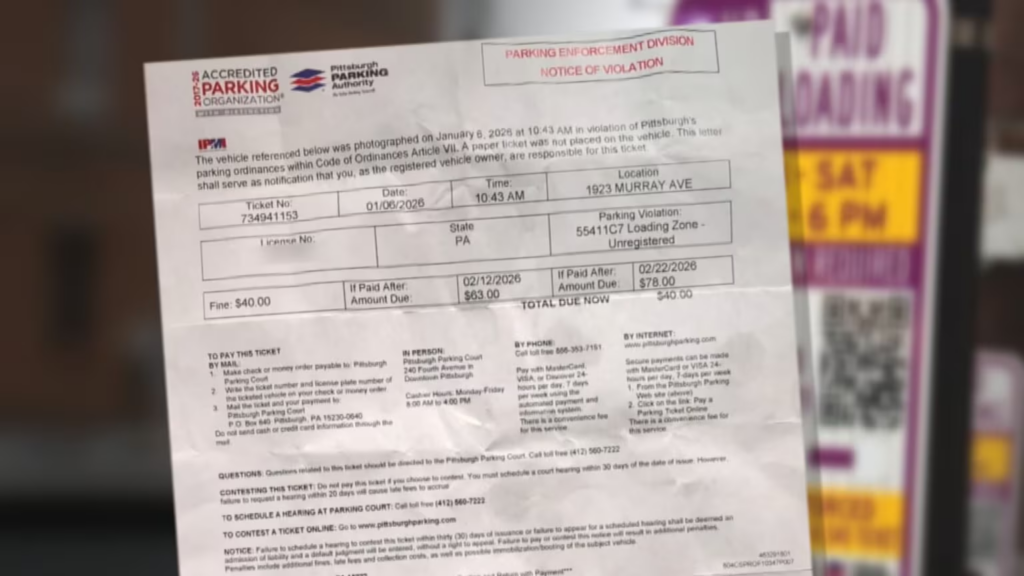
If you received a Pittsburgh Parking Authority ticket (including new “ticket‑by‑mail” violations), you can pay quickly online, by phone, or in person at Parking Court before late fees, booting, or registration problems kick in. The authority’s site and portal let you look up tickets by ticket number or plate, pay pink tickets, and even schedule hearings if you want to contest instead of paying.
👉 Pay your bill here:
- Pittsburgh Parking Authority Ticket Portal (Search & Pay)
- Pittsburgh Parking Court – How to Pay a Parking Ticket Online (links to online payment and phone options)
How to Pay Your Bill
Pay Without Login (Guest Pay)
You do not need a username/password account. You pay as a guest by looking up your ticket in the official payment portal.
Steps:
- Find your Pittsburgh Parking Authority ticket (paper or ticket‑by‑mail). You’ll need either:
- Go to the official portal: https://dspayments.com/Pittsburgh.
- Choose how to search:
- Enter the information exactly as it appears on your ticket/plate and click Search.
- The portal will show your open ticket(s), including amount due and status.
- Select the ticket(s) you want to pay and proceed to checkout/payment.
- Pay with an accepted credit/debit card (Visa, Mastercard, Discover), as indicated on the payment screen; a convenience fee may apply.
- Submit payment and save or print your confirmation.
If the ticket was issued today, it may not appear online until later or the next day; Reddit users report having to wait before the portal recognizes same‑day tickets.
Pay Online (With Account)
The Pittsburgh Parking Authority’s portal is ticket‑based, not account‑based. You can:
- Search by ticket number or plate,
- Pay one or more tickets,
- Or search by payment plan number if you’re already on a plan.
If you have a payment plan:
- On the ticket portal search page, use “Search by Payment Plan Number” if available.
- Enter your plan number (provided when you set up the plan).
- Review your installment amount and make your payment using the portal as instructed.
Everything is handled through the same public portal; you don’t need a traditional login.
Pay by Phone
You can pay Pittsburgh Parking Authority pink tickets and other parking violations by phone 24/7.
Official phone payment line:
- Parking ticket payments (pink tickets): 866‑353‑7151
Steps:
- Call 866‑353‑7151.
- You’ll reach an automated voice response system that handles payments with MasterCard, Visa, or Discover, subject to a convenience fee.
- When prompted, you can also say “get information” to speak with a customer service representative.
- Have your ticket number and license plate ready so they can locate your ticket.
- Confirm the amount due, provide your card details, and complete the payment.
- Write down any confirmation number you receive.
If you are unsure about fees, ask the representative to confirm the convenience fee for phone/card payments.
Pay In Person
You can pay in person at Pittsburgh Parking Court, located downtown.
Verified location and hours:
- Pittsburgh Parking Court
240 Fourth Avenue
(inside the Third/Fourth Avenue Parking Authority Garage)
Pittsburgh, PA 15222 - Cashier hours: Monday–Friday, 8:00 a.m. – 4:00 p.m.
Steps:
- Bring your ticket or mailed notice and a valid ID.
- Go to 240 Fourth Avenue during cashier hours.
- Pay at the cashier window; they typically accept cash and may accept card (ask at the window; card payments may have a fee).
- Get a printed receipt as proof of payment.
Reddit users also mention making payments at the downtown office at 240 Fourth Avenue, confirming this is a standard in‑person payment location.
Pay In Store (Retail Locations)
There is no indication that the Pittsburgh Parking Authority uses retail chains like Walmart, CVS, or grocery stores as authorized payment partners.
Some third‑party services or apps (e.g., generic “pay your ticket” sites) may claim they can pay Pittsburgh tickets, but they are not listed on the official PPA site. For urgent or overdue tickets, you should:
- Use the official portal (dspayments.com/Pittsburgh),
- The phone line (866‑353‑7151), or
- Parking Court in person.
Pay by Mail
The specific remittance address for paying tickets by mail is printed on your ticket or notice; the PPA site and FAQ refer broadly to multiple payment options but do not print a single mail‑to address in the snippets.
Follow what’s on your ticket:
- Look at the back of your ticket or ticket‑by‑mail notice for “Mail payment to” instructions.
- Write a check or money order payable to the entity printed on the ticket (e.g., “Pittsburgh Parking Authority” or similar—use the exact wording shown).
- Write your ticket number and license plate on the memo line.
- Include any payment coupon or stub from the ticket.
- Mail early enough that it arrives before any late fee deadline listed.
Reddit users note they have mailed checks to pay tickets, based on instructions printed on the ticket, to avoid online processing fees. Always follow the exact address and instructions on your notice; do not guess or copy an address from a different source.
Common Issues and Fixes
Cannot Log In
Because the Pittsburgh Parking portal is ticket‑based and does not require a user account, “login” problems are usually ticket lookup problems.
If you can’t pull up your ticket:
- Confirm you’re on the correct portal: https://dspayments.com/Pittsburgh.
- Re‑enter your ticket number carefully (no extra spaces or characters).
- If searching by plate, ensure correct plate number and state/province.
- If the ticket was issued today, wait until at least the next business day; users report the system may not update the same day.
- If it still doesn’t show and your notice is older, call 866‑353‑7151 and ask a representative to check the ticket in their system.
Forgot Ticket Number
If you lost the paper ticket:
- Check your mail; ticket‑by‑mail violations are sent to the registered owner’s address.
- Look for any follow‑up letter from the Parking Authority with your ticket number.
- If you know your license plate, try searching by plate + state in the payment portal; this can show outstanding tickets tied to your vehicle.
- If still stuck, call the Parking Court / PPA number at 866‑353‑7151 and ask what information they need to locate your ticket (name, plate, address).
Payment Not Going Through
If online or phone payment fails:
- Verify your card details and available credit.
- Try a different card or bank if the first one is declined.
- Try again later or from a different browser/device if the site is slow.
- If you suspect you’ve been charged but the ticket still shows unpaid, keep your confirmation screen or bank statement, and call 866‑353‑7151 to verify before paying again.
- If the portal seems persistently broken and the due date is close, consider paying in person at 240 Fourth Avenue to avoid additional penalties.
Website Not Working
If the portal or pittsburghparking.com is down or glitching:
- Confirm the URL:
- PPA: https://www.pittsburghparking.com/Home
- Ticket payment: https://dspayments.com/Pittsburgh.
- Try clearing cache or using a different browser or device.
- Check back later; users have reported occasional outages where online payment did not load, then worked again later.
- If you can’t wait, pay by phone (866‑353‑7151) or in person at Parking Court.
Tips to Reduce or Manage Your Bill
Payment Plans
The Pittsburgh Parking Authority’s ticket portal mentions searching by payment plan number, which indicates that payment plans are available for some drivers.
To explore options:
- Look for payment plan information linked from the PPA ticket portal or Parking Court page.
- Or call 866‑353‑7151 and ask about eligibility for a payment plan if you have multiple or older tickets.
Terms and availability may depend on how many tickets you have and whether they’re already in judgment or collections.
Negotiation Tips
You generally cannot negotiate the face value of standard parking fines with the Parking Authority staff. However, you can:
- Contest a ticket you believe is wrong (for example, signage issues, permit validity, or meter malfunction).
- You can schedule a hearing online through the ticket portal or call 412‑560‑7222 to schedule at Parking Court.
- If you missed a due date by a short time, it may still be worth explaining your situation at a hearing; the judge has more flexibility than clerks.
Avoiding Late Fees
- Pay or contest tickets quickly; Reddit users note that waiting can trigger late penalties and higher totals.
- With ticket‑by‑mail, read the due date and grace period on the mailed notice carefully; the Authority is expanding this program and mailing many more tickets.
- Use online or phone payment for fastest posting when close to due dates.
- If you park frequently in the city, consider keeping track of your plate in the portal to catch any new tickets early.
Assistance Programs
The PPA website and recent news do not list formal income‑based hardship or forgiveness programs for parking tickets.
Realistically:
- Your main relief mechanisms are payment plans (when offered) and contesting questionable tickets.
- If your situation is severe (multiple tickets, risk of boot/impound), consult a local legal aid or attorney to see if broader options (like bankruptcy or city programs) could impact your ticket debt.
FAQs
1. What is the official site to pay a Pittsburgh parking ticket online?
Use the official PPA ticket portal at https://dspayments.com/Pittsburgh, where you can search by ticket number or license plate and pay by card.
2. Can I pay my Pittsburgh parking ticket by phone?
Yes. Call 866‑353‑7151 to pay with MasterCard, Visa, or Discover using the automated system or by speaking to a representative; a convenience fee applies.
3. Where can I pay in person?
You can pay at Pittsburgh Parking Court, located at 240 Fourth Avenue, Pittsburgh, PA 15222, inside the Third/Fourth Avenue Parking Authority Garage (cashier hours Monday–Friday, 8 a.m.–4 p.m.).
4. What if my ticket isn’t showing online?
New tickets may take time to appear. Wait at least a day, then search again by ticket number or plate. If it still doesn’t show and your due date is near, call 866‑353‑7151 or go to Parking Court.
5. How do I contest a Pittsburgh Parking Authority ticket?
You can schedule a hearing online after looking up your ticket in the portal, or call 412‑560‑7222 to schedule a hearing at Parking Court.