You can pay City of Chicago parking, red‑light, and speed camera tickets online via the City’s secure ChiPay / online ticket site, by phone, by mail, or at in‑person centers. Using the official Chicago portals avoids extra third‑party fees and ensures your payment is correctly posted to prevent late penalties, booting, and vehicle impound.
👉 Pay your ticket here:
- City of Chicago – Pay Tickets Online (Official)
- Vehicle Violations Payment Plan Portal (ChiPay link)
How to Pay Your Ticket
Pay Without Login (Online – PayOnlineTicket.com)
Chicago’s primary official online ticket payment site is PayOnlineTicket.com, which lets you pay with just your ticket information—no full login or account profile required.
Steps:
- Go to https://payonlineticket.com.
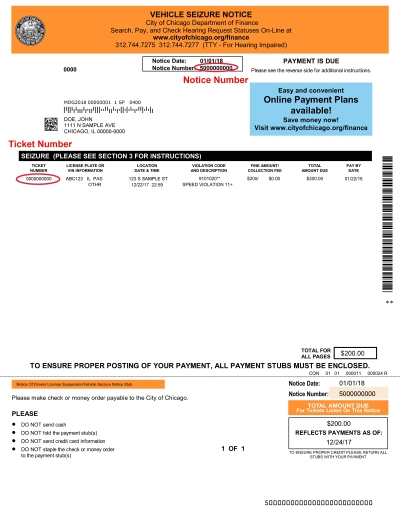
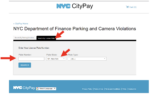
- On the “Pay Tickets Online” page, enter the ticket number for the violation you want to pay.
- The system will locate your parking, red‑light, or speed camera ticket and display the amount due; for red‑light tickets you can also review violation video.
- Confirm you have the correct ticket, then proceed to the payment section.
- Pay using an accepted method (typically credit/debit card; some options may include e‑check depending on the City’s current setup; details appear on the payment screen).
- Submit the payment and save your confirmation for your records.
For multiple tickets, you can repeat the process for each ticket. Some versions of the site allow you to search by plate or driver’s license via related ChiPay flows, but the simplest path is by ticket number.
Pay Online (With Payment Plan Portal / ChiPay)
If your fines are in collection/judgment or you need a payment plan, Chicago provides a Vehicle Violations Payment Plan Portal linked from ChiPay.
Use it when:
- You have many tickets and want to consolidate into a plan.
- Your vehicle is at risk of or already subject to boot/impound and you need a structured plan.
Steps:
- Go to the Payment Plan Portal for Vehicle Violations:
- On that page you’ll see a note directing you to ChiPay for paying tickets in full, searching tickets, or checking hearing status; follow any link to ChiPay if you don’t need a plan.
- If you’re enrolling in a payment plan, proceed through the portal’s steps (you’ll provide identifying details like driver’s license, plate, or ticket numbers).
- Once on a plan, you can pay installments online through that same portal.
For regular one‑off payments, PayOnlineTicket.com remains the main, simplest path.
Pay by Phone
The City of Chicago lists a customer service number for questions and assistance about parking and vehicle violations; payment‑plan info specifically references a customer service line.
- City of Chicago Vehicle Violations Customer Service:312‑744‑7275
While the portal page mentions this number for questions (payment plans, ChiPay issues), you can also:
- Call 312‑744‑7275.
- Ask whether you can pay your ticket by phone with a credit/debit card, and be ready to provide your ticket number, plate, and driver’s license, as requested.
- If phone payment is not directly supported, they will direct you to PayOnlineTicket.com or ChiPay, or an in‑person location.
If your ticket is a moving traffic offense heard in court (not a parking/camera ticket), you may instead need to pay through the Cook County Clerk of the Circuit Court online system. Traffic court information and payment instructions are on the Clerk’s site, but that is distinct from City parking and camera tickets.
Pay In Person
You can pay tickets at designated City of Chicago payment locations (e.g., Department of Finance or City payment centers), though these are not detailed on the snippets above. Typically:
- Use ChiPay or the City’s Department of Finance site to locate in‑person payment centers.
- Bring your ticket, driver’s license, and payment method (cash, check, money order, or card, depending on the location’s rules).
Since the exact addresses are not clearly listed in the sourced snippets, check the City’s finance or ChiPay pages for the most current location list before going in person.
Pay In Store (Retail / Third‑Party Sites)
Some private sites (like PayChicagoTickets.com, run by WinIt) offer to pay Chicago tickets for you. However:
- WinIt notes it is not affiliated with the City of Chicago or any government agency.
- It charges service fees for the convenience.
Use such third‑party services only if:
- You understand the fees and terms, and
- Your ticket is not close to any critical deadline (boot/impound/collection), because there may be processing delays.
For official, lowest‑fee payment, use PayOnlineTicket.com or directly through the City’s portals.
Pay by Mail
For parking and camera tickets:
- The City typically allows payment by mail using the envelope and instructions printed on the ticket or notice.
- Steps generally include:
- Write a check or money order for the amount due, payable to the appropriate City department as listed on your ticket (for example, City of Chicago or Department of Finance).
- Write your ticket number, license plate, and driver’s license (if requested) on the memo line.
- Include any payment coupon.
- Mail to the address printed on your ticket or notice, allowing several business days for delivery.
Because exact mailing addresses differ by notice and are not fully spelled out in the snippets, always go by the address printed on your paper ticket.
Common Issues and Fixes
Ticket Not Found Online
- Double‑check the ticket number (no extra characters, correct sequence).
- If using plate search via ChiPay, confirm plate number, state, and driver’s license are correct.
- Very new tickets may not be in the system yet; check again after a few days, or call 312‑744‑7275 if you’re near a deadline.
Unsure If Ticket Is City or County
- Parking and camera tickets in Chicago → Usually paid via PayOnlineTicket.com / ChiPay.
- Moving traffic tickets (speeding, DUI, etc., with court dates) → Paid via the Cook County Clerk of the Circuit Court online system, not Chicago’s parking portal.
Use the Cook County online traffic ticket payment system if your ticket is a moving offense with a court case, as described on the Clerk’s site.
Payment Not Going Through
- Check card number, expiration date, CVV, and billing ZIP.
- Try a different browser or device if PayOnlineTicket.com is not responding.
- If you suspect a payment was taken but not credited, keep your confirmation and bank proof and contact customer service (City finance or 312‑744‑7275) for verification.
Tips to Reduce or Manage Ticket Costs
Payment Plans
Chicago offers payment plans for vehicle violations through the Payment Plan Web portal.
- Use the portal when you have multiple tickets or large balances.
- The City may offer different plan terms based on income or hardship; details may be outlined in the portal or by customer service at 312‑744‑7275.
Avoiding Late Fees, Booting, and Tows
- Pay or contest tickets as soon as you receive them—Chicago can boot or tow vehicles with a certain number of unpaid tickets.
- Use the online system (PayOnlineTicket / ChiPay) to check for other outstanding tickets tied to your plate.
- If you are close to boot/impound status, contact the City immediately and ask about eligible payment plans via the Payment Plan portal.
FAQs
1. What is the official website to pay Chicago parking or camera tickets?
Use https://payonlineticket.com, the City’s official “Pay Tickets Online” site, to look up and pay tickets by ticket number.
2. Can I search by plate instead of ticket number?
Yes. Through the City’s ChiPay system (linked from the payment plan portal and ticket notices), you can search by plate, driver’s license, or summons number to see and pay tickets.
3. What number do I call with questions about my ticket or payment plan?
Call 312‑744‑7275 (Vehicle Violations customer service), Monday–Friday 7 a.m.–7 p.m., for questions about payment plans or online payment issues.
4. Should I use PayChicagoTickets.com or WinIt?
PayChicagoTickets.com (WinIt) is a private service that charges fees and is not affiliated with the City of Chicago; for official, lower‑cost payment, use PayOnlineTicket.com or City‑run portals.
5. Is this for parking/camera tickets or moving traffic tickets?
This process is for City of Chicago parking and camera (red‑light/speed) tickets. Moving traffic tickets tied to court cases are paid through the Cook County Clerk of the Circuit Court online system instead.